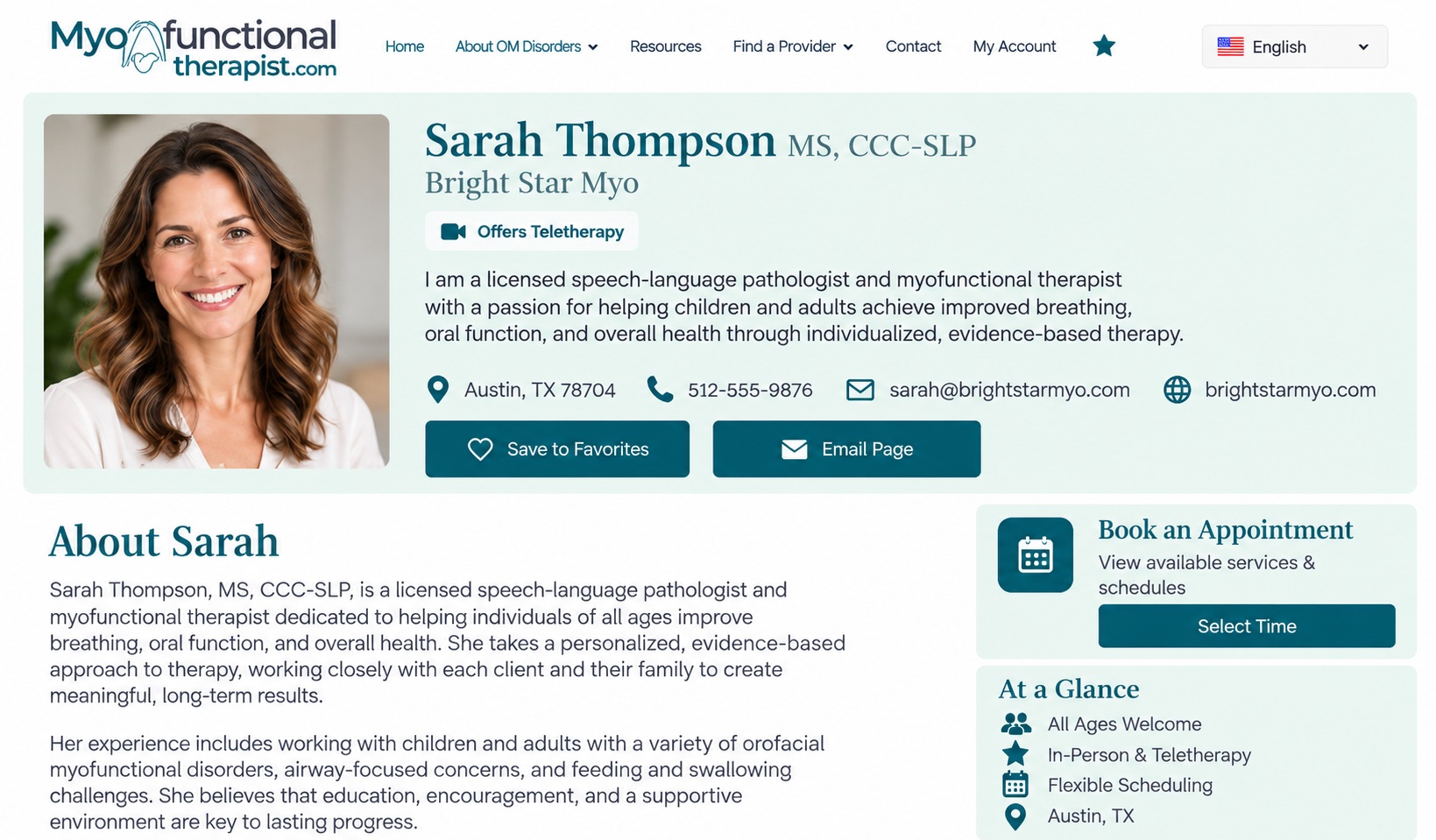

Start with a free 30-day trial. There’s no contract, and you can cancel anytime. Cancellations take effect at the end of your current paid billing period, and payments are non-refundable.

Your own professional webpage works like a standalone website, giving potential clients a dedicated place to discover who you are, learn about your services, and connect with you.
Let clients book directly from your profile, website, or booking link, with no limit on the number of appointments you can accept.
We actively promote and grow MyofunctionalTherapist.com to bring people straight to you—so you can spend less time finding clients and more time focused on care.
We optimize your profile page for Google, Yahoo, and Bing, giving your services visibility in search results when people are looking for myofunctional therapy.
Clients can easily see where you’re located, explore your location on an interactive map, and get directions right from your profile.
Clients can save your profile to their favorites, creating a list of providers they can easily return to when they’re ready to connect.
Language shouldn’t be a barrier to learning about myofunctional therapy. Clients can translate the site into their preferred language and discover providers in their community.
Log in anytime to update your details, refresh your photo, or make quick changes. Keeping your listing current takes just a few clicks.
Providers who offer teletherapy are clearly highlighted in the directory and on their profile, making it easy for clients to find providers who offer virtual appointments.
Clients can search for providers by language, making it easy to find someone who speaks their preferred language.
Your profile looks great and is easy to use on any device, making it simple for clients to find you, learn about your services, and book appointments from their phone, tablet, or computer.

Since 2012, MyofunctionalTherapist.com has made it easy for families and individuals to find a myofunctional therapy provider.

Myo Booking Included with Profile

Let clients book directly from your profile, website, or booking link.

Designed to meet privacy and HIPAA requirements. Client information is securely stored within your provider portal, where you can access appointment and intake information when you need it. Email notifications contain only essential appointment details and do not include sensitive medical or health information. Your information is supported by HIPAA-compliant services backed by a signed Business Associate Agreement (BAA).

Accept as many appointments as you need with no limits on the number of bookings you can receive.

Connect Google Calendar, Outlook, or Apple Calendar to keep your MyoBooking schedule in sync with the calendars you already use. Works alongside most other scheduling and booking platforms.

Easily connect your Zoom account to offer convenient virtual appointments with clients.

Choose from pre-made intake forms or use your own. Clients complete and submit forms online, and submissions are automatically added to your secure intake folder, ready to view, print, or download. Appointment confirmations include a link to your personal intake form page, and you’ll be notified when a form is submitted. You’ll also have a unique link to share your forms directly with clients or anyone who needs to complete them

Keep all of your client information organized in one place. View each client’s appointment history, upcoming and past bookings, and private notes—all from one convenient dashboard.

Offer group sessions, courses, workshops, or one-day events with a custom number of available spots.

Choose whether appointments are confirmed instantly or require your approval before they’re added to your schedule.

Manage different locations with separate calendars, availability, services, and appointment settings for each.

Offer as many services as you need. Each calendar comes with its own appointment duration, availability, and location. Add custom questions to your booking forms to gather the information you need. Responses are securely stored with the appointment and kept out of email notifications, helping protect private client information.
Set default hours or create different hour sets that you can easily switch between for things like shortened workweeks, split-service days, different locations, or specific services. Add breaks, buffers, and booking windows to fit your schedule.
Make teletherapy scheduling easier with automatic time zone conversion, so appointment times are displayed correctly for you and your clients.
With automatic appointment confirmations, reminders, cancellations, and rescheduling notifications, you and your clients will always stay informed.
Add private notes to individual appointments for your own reference. Keep important details, follow-up reminders, or notes about the appointment right where you need them.
Download your appointments as a CSV file whenever you need them for record keeping, reporting, or reviewing appointment details.
Embed your booking calendar directly on your website so clients can schedule appointments without leaving your site.